Sage Accounting has no purchase orders. Dream MRP adds them: raise a purchase order from your Sage products and services, email it to the supplier, and it closes itself when the supplier’s invoice is entered in Sage.
On Sage Accounting Plus, Dream MRP can also work out what to buy from your accepted quotes and stock. Nothing to migrate. Start with a No Risk Read-Only connection: Sage grants Dream MRP view-only access, so nothing is written to Sage until you say so.
Sage Accounting has no purchase order processing. Users have been asking Sage for it on the community forums for years, and the answer is still to move up to a desktop product or keep typing purchase orders into Word and spreadsheets.
Dream MRP adds the whole purchase order cycle on top of the Sage business you already run, on Sage Accounting Standard as well as Plus. Nothing changes in how you enter invoices.
Create a purchase order from your Sage products and services, goods or services alike. On Plus, Dream MRP can also plan them from your accepted quotes and stock, grouped by supplier.
Approve the order and Dream MRP emails the supplier a PDF purchase order that asks them to quote its number on their invoice. Planned orders for trusted suppliers can go out automatically.
When the goods and the supplier’s invoice arrive, enter the purchase invoice in Sage just as you do today. Nothing changes in your bookkeeping.
On the next sync Dream MRP matches the invoice to its purchase order and records the receipt. A part invoice leaves the rest of the order open; voiding the invoice in Sage reopens it.
Tip: put the Dream MRP purchase order number in the purchase invoice’s Reference field in Sage and the match is exact. Without it, Dream MRP matches to the oldest open order for that supplier and item.
Raise purchase orders yourself, or on Sage Accounting Plus let Dream MRP plan them from your quotes and stock; work orders are planned from your quotes on either plan. You decide how much it does on its own, from nothing to sending purchase orders and opening work orders for you.
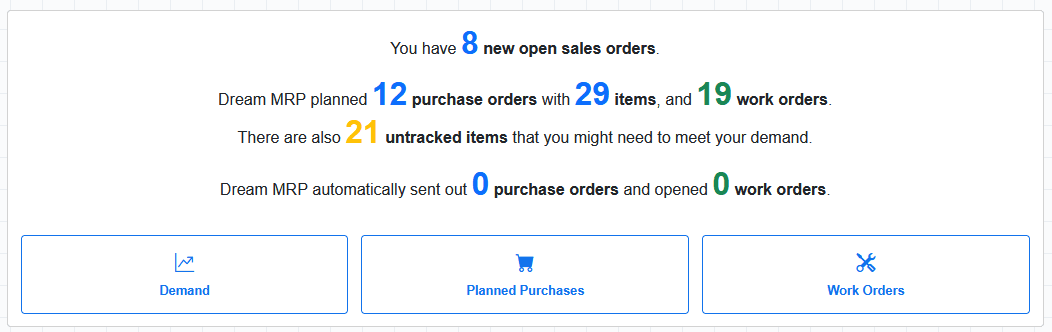
Grouped by supplier, dated and quantified. Check them and send, or let trusted suppliers go out automatically.
One per product to make, exploded from your bills of materials. Open the ones you want to start.
Items you do not track in Sage are still in the plan, so you see the whole requirement before tracking is switched on.
Automatically sent 0, opened 0: you decide how much runs by itself, from nothing, as here, to purchase orders sent and work orders opened without you.
Dream MRP connects to Sage Accounting through Sage’s official API. Your products, contacts, accepted quotes and purchase invoices flow in automatically, so purchase orders are raised against the products and suppliers you already keep in Sage.
Products and services come in ready to put on purchase orders and bills of materials. On Plus, stock items come in with their quantity in stock too.
Sage Accounting has no sales orders, so an accepted quote or estimate is the demand signal. Once it is invoiced, declined or expired it drops out of the plan.
Suppliers are ready to put on purchase orders. Purchase invoices give the purchase history and last-paid price, and close the orders they belong to.
On Plus, the reorder level, reorder quantity and usual supplier you keep on a Sage stock item become its minimum stock level, minimum reorder quantity and default supplier in Dream MRP.
On Plus, closing a work order posts stock movements to Sage: components used go down, the finished product goes up, at Sage’s average cost. Nothing is written over a read-only connection.
Build your BOMs inside Dream MRP against your Sage item codes. CSV import lets you migrate a spreadsheet of components in minutes rather than typing them in.
Best for: Businesses on Sage Accounting that need proper purchase orders without moving to an ERP or a desktop Sage product, and makers who want their purchasing and production planned for them.
Your products, contacts, quotes and purchase invoices come out of Sage automatically. Purchase orders, bills of materials and work orders then live in Dream MRP, which is exactly where Sage Accounting has nothing to offer.
Dream MRP writes to Sage only when you ask it to: a new supplier when you choose to send one, and on Plus, stock movements when a work order closes. Purchase orders are not posted to Sage; the purchase invoice you enter closes them instead.
| What the connection covers |
|---|
| Purchase orders, raised or planned, approved and emailed |
| Purchase invoices close purchase orders |
| Products and item codes sync from Sage |
| Customers and suppliers sync as contacts |
| Accepted quotes and estimates show demand |
| Quantity in stock nets off that demand (Plus) |
| Bills of materials, multi-level |
| Work orders, with stock movements posted on completion (Plus) |
You do not need inventory control in Sage to get purchase orders. Standard connects and gives you the full purchase order cycle. Plus adds stock items, which is what lets Dream MRP work out the purchase orders for you.
Upgrade from Standard to Plus in Sage and the next sync starts bringing in your stock, with no need to reconnect.
No inventory control needed. Your products and services come in, and you raise purchase orders from them, email them to suppliers and let your Sage purchase invoices close them. Ideal for buying services too. Work orders are planned and closed as usual, without stock movements.
Everything on Standard, plus stock items with their quantities and reorder settings. Dream MRP plans purchase and work orders from your quotes and stock, and posts stock movements back when a work order closes.
Sage Accounting Start has no products, quotes or purchase invoices, so there is nothing to raise orders from. A Start business is refused when you connect, with the reason.
Dream MRP connects to Sage Accounting businesses in the UK, Ireland and Canada. US businesses are not supported yet.
Connect as a Sage user with Full Access. One Sage login with several businesses can connect each as its own Dream MRP organisation. A read-only connection asks Sage itself for view-only access, so nothing can be written until you lift it on the Organisations page.
Sage is your accounting backbone — Dream MRP adds the purchasing and manufacturing layer. Bills of Materials, multi-level assemblies, work order tracking and purchase orders all work the same whichever accounting system you use.
You can also connect Shopify alongside Sage to bring in e-commerce demand alongside your accounting data.
Dream MRP includes a No Risk Read-Only connection — explore all your MRP calculations before Dream MRP creates a single order. Connect today, see your results immediately, make it two-way when you are ready.
14-day free trial · Premium plan · No credit card · Read-only connection optional