Four steps: connect, integrate, configure, run. Most users are up and running within the same 30 minutes that they sign up — and the first three steps are each optional, so you can set up as little as you need before your first run.
No ERP and no new inventory system: Dream MRP plans from the order and stock data already in your connected systems.
Step 01 / Connect
Connect your accounts.
Sign in and link Dream MRP to the system your data already lives in. Your items, sales orders, suppliers, stock and purchase history flow in automatically.
Xero and QuickBooks connections can start read-only: see the plan from your real data, then decide when to let Dream MRP post anything back. Pick whichever one fits. Shopify can stand on its own — no accounting system is required — and whichever you start with, adding another later does not mean starting over.
Reads items, stock, customer accepted quotes and contacts. Approved purchase orders post back to Xero and completed work orders update tracked quantities, or start read-only and nothing is written at all. Xero setup guide →
option_b
QuickBooks Online
Reads items, inventory and sales orders. On plans with inventory (Plus and above) approved purchase orders post back, or start read-only and nothing is written. QuickBooks setup guide →
option_c
Shopify — stand alone
No accounting system at all. Your store already holds the items (SKUs) and their on-hand quantities that the calculation needs, so Shopify on its own is enough to run planning. Shopify setup guide →
Step 02 / Integrate
Optionally add more sales channels.
Bring in additional demand sources alongside your accounting system. Orders from these channels become the demand signal that drives your material requirements.
These integrations are optional — connect as many or as few as you need.
option_d
Shopify alongside accounting
Already on Xero or QuickBooks? Add the store as a second demand source and one MRP run covers both, so retail and trade are planned together rather than separately. Learn more →
option_e
Custom API
Push sales orders and items directly via the Dream MRP REST API. Suitable for custom ERP and enterprise setups.
Step 03 / Configure
Set up your Bills of Materials.
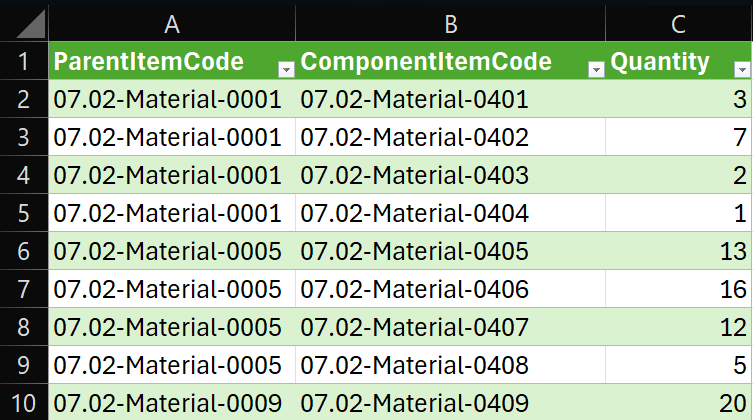
If you are a manufacturer, Bills of Materials tell Dream MRP how your products are made. A BOM links a finished product to its component parts with quantities. Dream MRP explodes these automatically when calculating requirements.
BOMs are optional — if you only resell finished goods, you can skip this step and run MRP directly against your sales, sales forecasts and inventory.
Furniture kit requires: 4× Side panel, 2× Shelf, 16× Screw
Sub-assembly is itself a component — Dream MRP supports up to 5 levels of nesting
CSV import format
Item codes must match those in your connected accounts system.
CSV import: one row per component, using your item codesOr type it in: the on-screen editor on the item
Step 04 / Run
Run Dream MRP, review and approve.
One button triggers the full MRP calculation. Dream MRP analyses your open sales orders, existing stock, BOMs, and open purchase orders — then creates a set of planned purchase orders and work orders to cover every shortfall.
You review each planned order, adjust anything you want, then approve. Approved purchase orders are posted back to your accounts system. Work orders get processed in Dream MRP.
Use Read-Only connection to see the full plan while preventing Dream MRP from posting anything to your accounts system.
calculates / demand
Demand Analysis
Every open sales order is exploded through your BOMs to calculate raw component requirements across your entire order book.
calculates / supply
Supply Netting
Current stock levels and open purchase orders are netted against requirements to calculate shortfalls item by item.
creates / purchases
Purchase Orders
Planned purchase orders are grouped by supplier, correctly dated and quantified. Review and approve individually or in bulk.
creates / production
Work Orders
Work orders are created for manufactured items. Track progress from open to in-progress to complete across your whole team.
Step 05 / Automate
Configure advanced features and automation.
Once the plan looks right, you can stop reviewing the parts of it you trust. Dream MRP will raise and send the orders on its own, for exactly the suppliers and products you choose — and leave everything else under manual control.
None of this is all-or-nothing. Automation is set per supplier and per item, so you can turn it on for the routine work and keep judgement calls on your desk.
Set a minimum level so an item is replenished before an order forces the issue, and a package size so planned quantities come out as whole batches rather than odd numbers.
forecasts
Plan beyond confirmed orders
Add sales forecasts and switch them into the calculation to buy long-lead components before the orders land. One checkbox takes a forecast back out again, with nothing lost.
per supplier
Auto-approve purchase orders
Flag the suppliers you trust and their planned orders arrive already approved, grouped one per supplier and ready to send — everyone else still goes through review.
per product
Auto-start work orders
For settled products, Dream MRP starts the work order itself, emails the owner the PDF and puts the build on the factory display — no release step in between.
Availability varies by plan — forecasts and minimum stock levels from Standard up, auto-approve and auto-start on Premium. See pricing for the full breakdown.
Ready to run your first MRP?
14-day free trial · No credit card · Up and running in <5 minutes